
LogoDocumentos MkSaaS
Página inicialIntroductionCodebaseVideo TutorialsGetting StartedEnvironment Setup
Configuration
Website ConfigurationNavbar MenusFooter MenusSidebar MenusAvatar ButtonSocial MediaPrice PlansCredit packages

Integrations

DatabaseAuthenticationEmailNewsletterStorage
Payment
CreditsCron JobsAIAnalyticsNotificationCaptchaChatboxAffiliates

Customization

MetadataFontsThemesImagesi18nBlogDocsComponentsCustom PagesLanding PageUser ManagementAPI Key Management

Codebase

IDE SetupProject StructureFormatting & LintingUpdating the Codebase
X (Twitter)
Configuration

Footer Menus

Configuring the links in the website footer

Defines the links in the website footer, each item is NestedMenuItem.

src/config/footer-config.tsx
export function getFooterLinks(): NestedMenuItem[] {
  const t = useTranslations('Marketing.footer');

  return [
    {
      title: t('product.title'),
      items: [
        {
          title: t('product.items.features'),
          href: Routes.Features,
          external: false,
        },
        // More product links...
      ],
    },
    {
      title: t('resources.title'),
      items: [
        {
          title: t('resources.items.blog'),
          href: Routes.Blog,
          external: false,
        },
        // More resource links...
      ],
    },
    // More footer sections...
  ];
}

Footer links are organized in columns with headers. Each column has a title and a list of links. The structure allows for a clean organization of links by category.
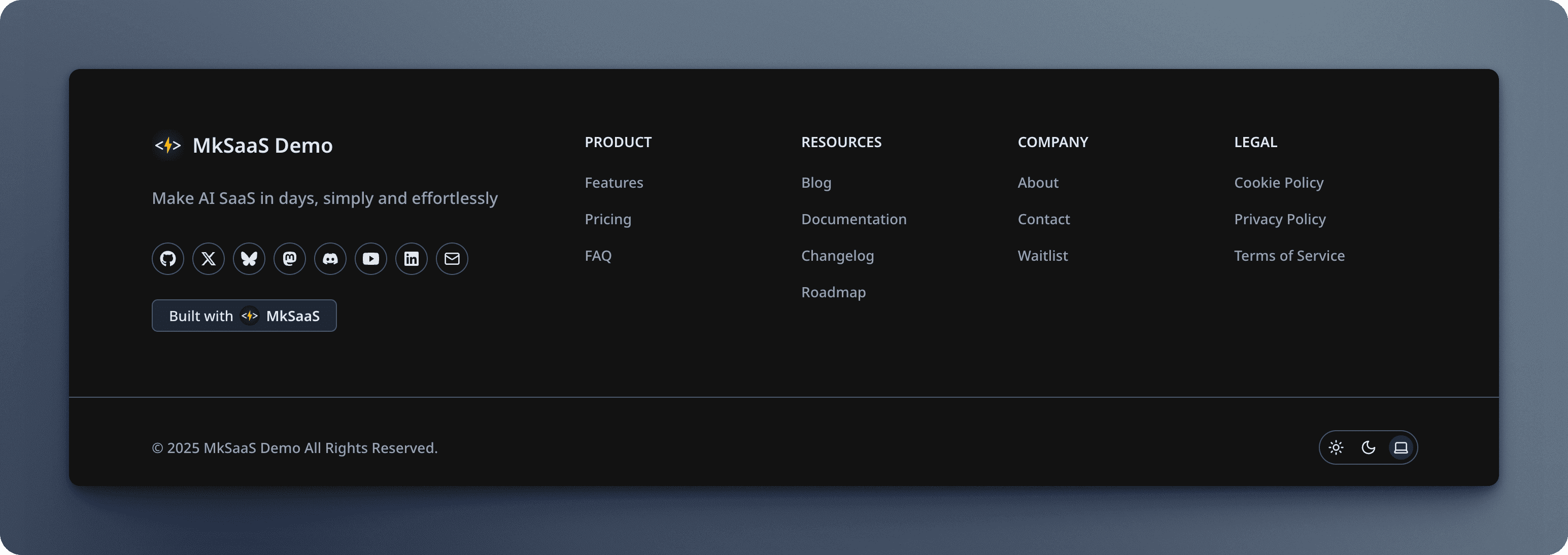
Footer

Video Tutorial

Next Steps

Now that you understand the footer configuration, explore these related topics:

Website Configuration

Configure core settings for your MkSaaS website

Navbar Configuration

Configure the navigation menu in the header

Social Configuration

Configure social media links

Sidebar Configuration

Configure the navigation menu for dashboard

Navbar Menus

Configuring the navigation menu in the website header

Sidebar Menus

Configuring the navigation menu for dashboard pages

Índice

Video Tutorial
Next Steps